This program runs on a laptop and reads the files that have been stored on the micro:bit’s file system using the MicroFs system described in the previous blog post.
This is the third in a series of programs about using the micro:bit’s file system.
Program 1: Basic writing, and reading of text to a file
Program 2: Slightly more advanced version of program 1
I have used a Windows PC and Python, and I think it will also work on Linux and Apple Mac computers.
Note there seems to be a limitation with MicroFs (or my knowledge), in that the contents of files on the micro:bit can not be read directly – instead, they need to be copied onto a laptop first before being read
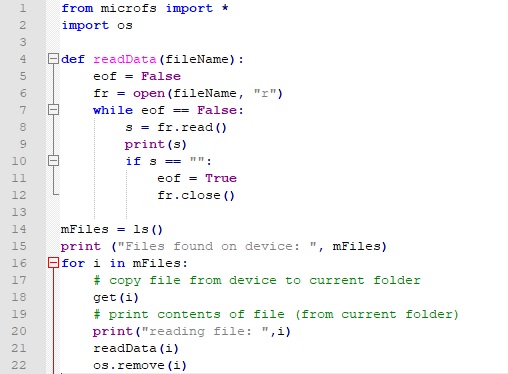
Line 1 This imports the MicroFs file system, which you need to have installed on your laptop. The documentation to this is here and I have written about it here
Line 2 imports os – used to delete the file afterwards
Lines 4 to 12 the readData() function to read data (reused from Program 2).
Line 14 Gets the names of the files on the micro:bit (this is the same as the command ‘ufs ls’) and returns the names in a list
Line 15 Shows the names of the files that were found
Line 16 to 21 Loop over each file (in the list) and print out the contents of the file
Line 18 copies the file from the micro:bit’s file system to the current directory (it seems a limitation of MicroFs that you can not access the files directly)
Line 21 call readData() to open the file, read each line of the file, and close the file afterwards
Line 22 delete the file from the local folder, to tidy up the local folder
This code has been created to be freely downloaded, adapted and used. If a school could mention our software for primary/elementary students we would be very grateful stormeducational.co.uk (with free online demos at stormedapps.co.uk).